
Cell Phone Accessory Store Display Ideas
Cell phone accessory store display ideas should make compatibility, product type, and price easy to compare. Organize cases, cables, chargers, screen protectors, mounts, audio accessories, and small electronics into clear wall or case zones, then select hooks, shelves, baskets, or secure fixtures from the actual package and operating needs.
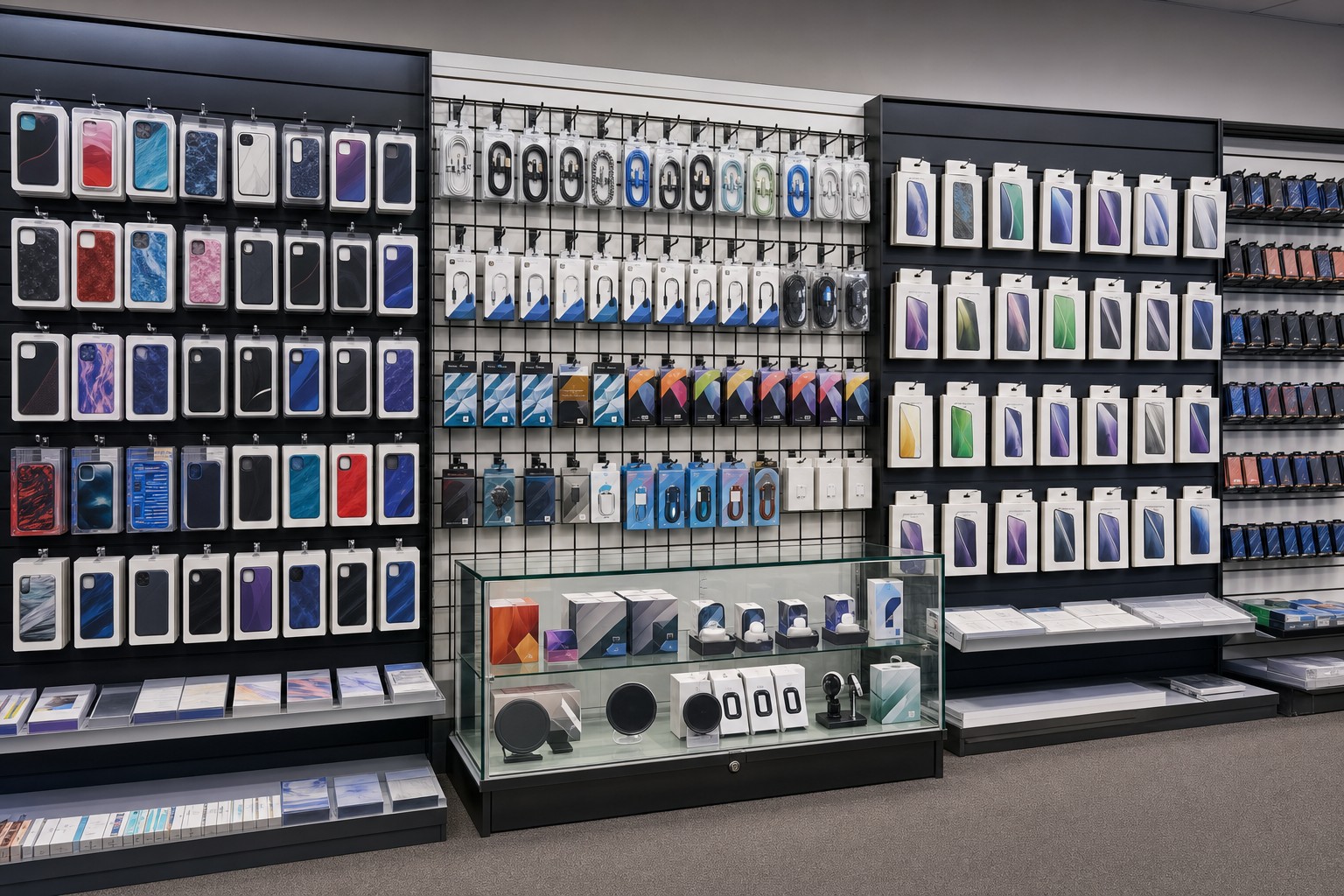
Phone accessory stores often carry many visually similar packages. A dense display may hold inventory efficiently but still fail if customers cannot identify the correct device, connector, size, or use. The fixture plan should reduce that confusion.
Organize by the Customer's First Question
Customers usually begin with one of four questions:
- Does this fit my phone?
- Is this the right connector or charging type?
- What does this accessory do?
- Which option fits my budget or feature needs?
Build the display sequence around those questions. For cases and screen protectors, device compatibility should lead. For cables and chargers, connector and power requirements may lead. For mounts and audio accessories, use case may be the clearest starting point.
Do not group products only by package color or brand if that makes compatibility harder to understand.
Quick Fixture Comparison
| Fixture or accessory | Best suited to | Main buyer check |
|---|---|---|
| Gridwall hooks | Carded or hole-punched cases, cables, and packaged accessories | Package opening, width, hook length, and panel compatibility |
| Slatwall hooks | Suitable hanging packages on a compatible slatwall system | Exact panel and accessory compatibility |
| Shelves | Boxed electronics, demonstration units, or larger packages | Product footprint, support method, and access |
| Baskets | Loose, refill-heavy, or irregularly packaged low-value items | Containment, reach, and category clarity |
| Display cases | Products requiring controlled access or stronger presentation | Visibility, staff access, lighting, and operating procedure |
Use Gridwall for Changing Accessory Assortments
Gridwall may suit stores that change layouts frequently or need flexible hook spacing. Review grid accessories and the broader gridwall accessory range.
Measure representative packages before selecting hooks. Phone-case packaging may be wide, cable packages may be narrow, and boxed chargers may need a shelf rather than a hook. The layout should let customers remove one item without knocking adjacent products loose.
Use gridwall hooks only with a confirmed compatible panel and attachment. Similar-looking slatwall and gridwall hooks are separate product families.
Use Slatwall for a More Integrated Wall
Slatwall can support a clean, planned wall presentation with compatible hooks, shelves, faceouts, or other accessories. Review current slatwall accessories and confirm the exact panel system before ordering.
Slatwall may suit a permanent store wall where the retailer wants an integrated finish and repeatable accessory rows. Gridwall may suit a more visibly utilitarian or frequently reset display. The best choice depends on the store, merchandise, installation, and brand rather than a universal rule.
Create Device-Compatibility Zones
Cases and screen protectors should be grouped so customers can locate their device without scanning the entire wall. Use a consistent order across every section. If a device family has several models, separate them clearly and keep product information accurate.
Avoid unsupported compatibility claims. Product packaging and current manufacturer information should govern the merchandising label. When inventory changes, remove obsolete or misleading signs promptly.
Separate Cables, Chargers, and Power Accessories
Cables and chargers can look similar while serving different needs. Create separate zones for connector type, length, intended use, or confirmed technical category. Do not make performance or compatibility claims that are not supported by the product information.
Keep related products adjacent where the connection is clear. A shopper looking for a cable may also need a compatible charger, but the display should not imply that every item works with every device.
Use Secure Displays Selectively
Some products may require controlled access because of value, size, or store policy. A wall display case can present selected merchandise while keeping staff involved in the purchase.
Secure displays should not hide basic product information. Customers still need to understand the product category and key confirmed compatibility before asking for assistance. Place staff-access products where the operating process does not block the main aisle or checkout.
Plan Demonstration and Sample Areas Carefully
If the store uses demonstration products, separate them from sealed sellable inventory. Make the sample status clear and establish a staff process for cleaning, charging, securing, and replacing demonstration units.
Do not create a live demonstration zone unless the store has confirmed power, cable management, device security, accessibility, and maintenance procedures. A simple visual sample may be more practical than an active device for some products.
Control Density and Replenishment
Accessory walls can become crowded quickly. Use enough facings for important products without allowing packages to overlap or hide compatibility labels.
Plan a replenishment sequence:
- identify fast-moving categories
- assign practical facing quantities
- keep backstock organized in the same category order
- check labels during replenishment
- remove empty hooks or obsolete signs
Empty space can improve navigation. It is not necessary to fill every panel position.
Build an Easy-to-Shop Store Path
Place high-frequency categories where they are easy to find. Use secondary walls or fixtures for specialized accessories, seasonal products, or slower-moving items. Keep the checkout area clear enough for service and avoid placing projecting hooks where queues form.
Measure loaded projection from the wall, including packages and accessories. A narrow store needs especially careful aisle planning.
Common Display Mistakes
The first mistake is mixing incompatible device products in one visual group.
The second is choosing hooks before measuring packages.
The third is using the same fixture for every product, including boxed or controlled-access merchandise.
The fourth is maximizing density until labels overlap.
The fifth is making unsupported device, power, or performance claims in signs or article copy.
Buyer Checklist
- List product categories and representative package dimensions.
- Define the compatibility logic customers need first.
- Choose gridwall, slatwall, shelves, baskets, or cases by product.
- Confirm panel and accessory compatibility.
- Measure loaded projection and shopper clearance.
- Separate samples from sellable inventory.
- Plan labels, price information, backstock, and replenishment.
- Confirm current dimensions, finishes, availability, and product guidance.
Frequently Asked Questions
What is the best display system for a cell phone accessory store?
The best system depends on package type, assortment changes, store finish, installation, and security needs. Gridwall, slatwall, shelves, and display cases can each serve different zones.
Are hooks good for phone cases and cables?
Hooks can work for suitable hanging packages when their size and attachment match the product and panel. Boxed or irregular items may need shelves or baskets.
How should phone cases be organized?
Lead with confirmed device compatibility, then organize by style, protection level, finish, or price as appropriate.
Should expensive accessories go in a display case?
Controlled-access display may suit selected products depending on store policy and operating needs. Balance security with visibility and staff access.
Can gridwall and slatwall hooks be interchanged?
Do not assume they can. They are different accessory families unless the exact product information explicitly confirms compatibility.
Final Recommendation
The strongest cell phone accessory store display ideas reduce compatibility confusion while keeping products visible and replenishment manageable. Start with the customer's decision, measure real packages, and select the panel and accessories as a system. Send the store dimensions, package examples, preferred wall type, and security needs through Samples & Quotes for project-specific review.
Retail Planning Resource
The National Retail Federation publishes retail operations and consumer research useful for broader store-planning decisions.